DISABLE ETHICS
ETHiCS-CH4LLENGE.2026.TRAINER.4TRICH.exe
ETHICS CHALLENGE - LEADERBOARD ADJUSTEMENT TOOL - A TRAINER BY 4TRICH ETHICAL CREW - GREETINGS TO EVERY ETHICAL PERSON AROUND -
Challenge URL :

?
Token :

?
Quizz :
Good answers:
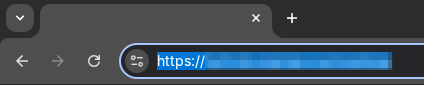
  • 1. Copy the Web address of the Ethics Challenge® website.
  • 2. Back to our tool, paste it in the Challenge URL text field.

This step is trickier. But we know you can do it ⸜(。˃ ᵕ ˂ )⸝♡

Here we'll retrieve the Authentication Token from your connected session, a unique identifier that will allow the tool to communicate with the Ethics Challenge® website using your account.

  • 1. Open a new tab, go to the Ethics Challenge® website and ensure you're connected to your account.
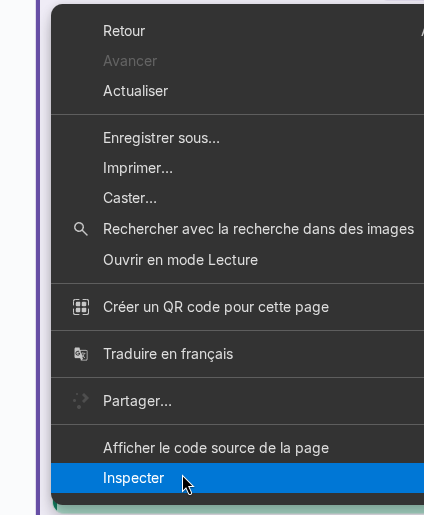
  • 2. Right click anywhere on the page and select Inspect.
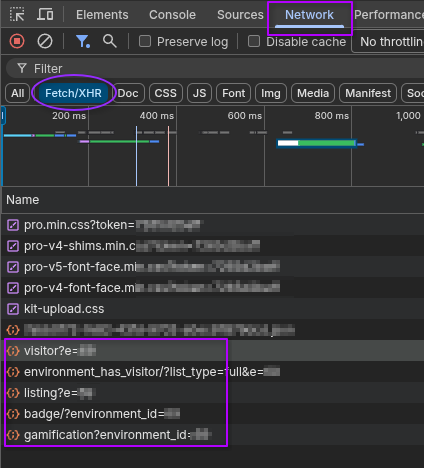
  • 3. Click on the Network tab. It should be empty.
  • 4. Refresh the page using the F5 key on your keyboard. (or use CTRL+R, or Cmd+R on macOS)
  • 5. Click on the Fetch/XHR button.
  • 6. Click/select a row containing one of the following names listing, badge, gamification, roadmap, gamification, visitor or environment_has_visitor.
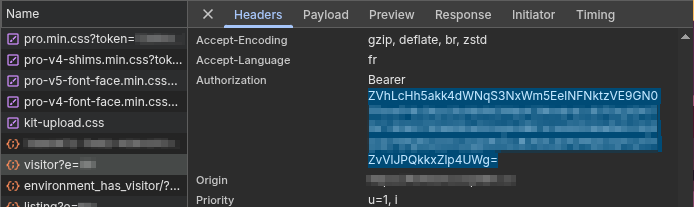
  • 7. On the right (or bottom) panel that appears, click the Headers tab
  • 8. Scroll down, find the Authorization field and select/copy the whole weird cryptic string of random characters that follow the word Bearer. Note that it MAY end with an equal symbol (=), don't forget to select it as well!
  • 9. Back in our tool, paste it into the Token text field.
  • 10. Click CONNECT!
WARNING ! WARNING ! WARNING ! WARNING ! WARNING !

You've just entered the NON-ETHICAL MODE.

The 4TRICH ETHICAL CREW will decline all responsibility for any non-ethical action you engage in from now on.

You've been warned.

You're alone now.